

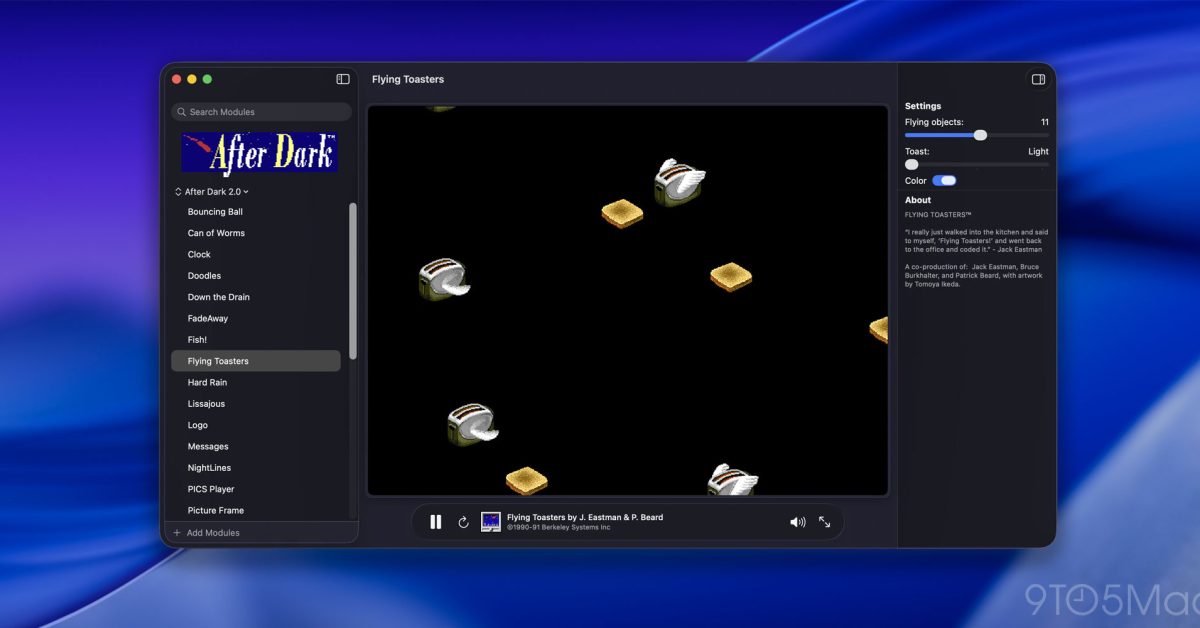
This project by Jeff Halter (via Daring Fireball) lets users run the original 68k After Dark screen saver modules on contemporary Macs. Details follow.
’Run classic After Dark screen savers on modern macOS’
If you started using Macs a while ago, you probably recall After Dark, a suite of screen savers that became a staple on Macintosh computers throughout the 1990s. At the very least, you may know the iconic Flying Toasters saver.
Historically, running these vintage savers required either old hardware or a classic Mac OS emulator, which could be finicky. A new effort called Afterglow simplifies the process for today’s Macs.
As John Gruber noted on Daring Fireball, the work comes from Jeff Halter, who previously built Lunacy, a native Swift app that lets users play the classic Lunatic Fringe game from More After Dark on modern Macs.”
Afterglow runs the original After Dark modules through a purpose‑built emulator, eliminating the need for a full classic Mac OS environment. The app also ships with a modern macOS screen saver module, enabling users to set any imported After Dark module as their Mac’s saver.
Here’s why Halter created the project:
In the ’90s, Berkeley Systems’ After Dark collection brought Flying Toasters, Fish, and Starry Skylines to Mac screens everywhere. Beyond preventing burn‑in on CRT monitors, they entertained with animations that could be funny, surreal, beautiful—or even grotesque.
These creations are artistic works worth preserving.
Running After Dark modules today has traditionally required fiddly configuration of Mac OS emulators or vintage hardware. Even then, no single emulator or old computer could render every module faithfully—some animations ran too fast, others too slow.
Afterglow is an emulator designed specifically for After Dark modules—the original 68k code, not a remake or port—without relying on ROMs or classic Mac OS. Built with software preservation in mind, it makes After Dark easy to enjoy now and for years to come.
The project’s website notes that the After Dark modules are not bundled but provides instructions for locating and importing them into Afterglow.
Halter also mentions that Afterglow offers features such as module controls, full‑screen mode, a randomizer, multimodule support, 3D box art, a CRT shader, a resource inspector, and a DrawMorph editor.
For more information, check out this link.
Consider exploring it on Amazon
In the ’90s, Berkeley Systems’ After Dark screen savers brought Flying Toasters, Fish, and Starry Skylines to Macintosh screens everywhere. They served a practical purpose in preventing burn-in on CRT monitors, but also entertained, with animations that could be funny, surreal, beautiful — sometimes gross.
They are works of art worth preserving.
Running After Dark modules in the present day has involved fussy configuration of Mac OS emulators or vintage hardware. Even then, no single emulator or vintage computer can faithfully run every module: some animate too fast, some too slow.
Afterglow is an emulator built specifically for running After Dark modules — the original 68k module code, not a remake or port — with no dependencies on ROMs or classic Mac OS. Created in the spirit of software preservation, it makes After Dark easy to enjoy today and for years to come.