

Welcome to Indie App Spotlight, Digitio’s weekly series highlighting new apps from independent developers. If you’re a developer and want your app featured, reach out.
iOS 27 reached the public nearly two weeks ago, headlined by Siri AI. Although Siri AI represented a major leap over previous versions, it still has limitations. QuillCue addresses one gap by offering a custom keyboard that lets users store prompts for future use.
Key Features
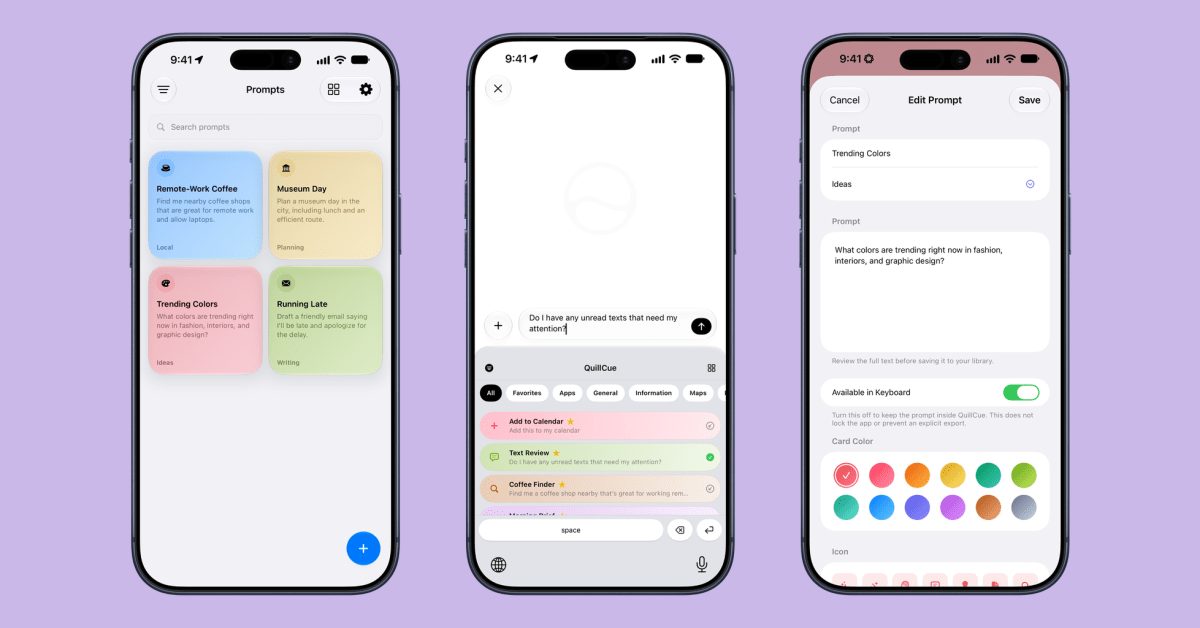
QuillCue is a strong concept. By leveraging iOS custom keyboards, it lets users insert fully written prompts into Siri AI. Simply swipe down from the top of the screen, switch to the custom keyboard, choose a prompt, and press enter.
It saves significant time when you regularly ask Siri the same kinds of questions but don’t want to retype them repeatedly. One default prompt finds nearby coffee shops that allow laptops for remote work. Because results depend on location, retrieving fresh recommendations can surface places you may not have known about.
You can pre-write any prompt that Siri AI can process. QuillCue removes the need to repeat or retype it each time, making Siri AI more convenient to use.
If you create a longer prompt containing multiple steps, QuillCue can save considerable time, because Siri AI currently lacks a notion of “skills” or learning from your usage. The possibilities are essentially endless. The app also includes folders for organizing different prompts.
Finally, it supports importing and exporting prompt libraries, making it easy to share prompts with friends or move them between devices.
Get the app
QuillCue is free on the App Store, with no ads or in-app purchases. You can follow developer Parker Ortolani on X for updates.
It requires an iPhone running iOS 27.0 or later and is currently available only to users in the United States.
My top Apple accessory picks:
Follow Michael on X/Twitter, Bluesky, and Instagram.